Early Departure Fee for Reservations
Stay allows users to charge an Early Departure Fee for reservations that depart prior to their scheduled departure date. The early departure fee is calculated based on the Early Departure Policy associated with the group.
Feature Setting
-
Name: Early Departure Fee
-
Value: Must be enabled
-
Comments: License is not required
Permission
-
Stay_ManageEarlyDeparturePolicy: Users with this permission can add or modify the early departure policies. By default, this permission is assigned to users with access to the following roles:
-
System Administrator
-
Stay Hotel Manager
-
Department Manager
-
Stay Hotel Supervisor
-
Stay Accounting
-
-
Stay_OverrideEarlyDepartuePolicy: Users with this permission can override and change the early departure policy that associated with a reservation. By default, this permission is assigned to users with access to the following roles:
-
System Administrator
-
Stay Hotel Manager
-
Department Manager
-
Stay Front Desk
-
Stay Hotel Supervisor
-
GSA Supervisor
-
Stay Accounting
-
Users can select the early departure policy to be associated with the group from the Early Departure Policy drop-down list on the Group Booking tab of the Group screen. This field is a single-select drop-down list that displays all the active early departure policies configured at the property. The following message is displayed when a policy that was previously mapped to a rate plan is inactivated: The Early Departure Policy is No longer active. Please select another policy.
Assigning Early Departure Policy to Reservations
When the reservations are created, based on the early departure policy mapped to group, the policy is applied to the reservations based on the following order of priority:
-
From Interface: When the reservations created from third-party systems have an early departure policy mapped, the policy is applied to the reservations as first order of priority.
-
Group: When the reservations created from third-party systems do not have an early departure policy mapped, the policy associated with the group from which the reservation is created is applied as the next order of priority.
-
Default Policy at the Property: When there is no policy mapped to the third-party systems, rate plan/package/group, the early departure policy that is set as the default policy for the property is applied.
When there is no early departure policy configured at the property, the created reservations will not have any early departure policy mapped and are not charged an early departure fee for early departures.
Indicating Early Departure Policies in Reservations
The early departure policy to be applied to the reservation is displayed in the following screens:
-
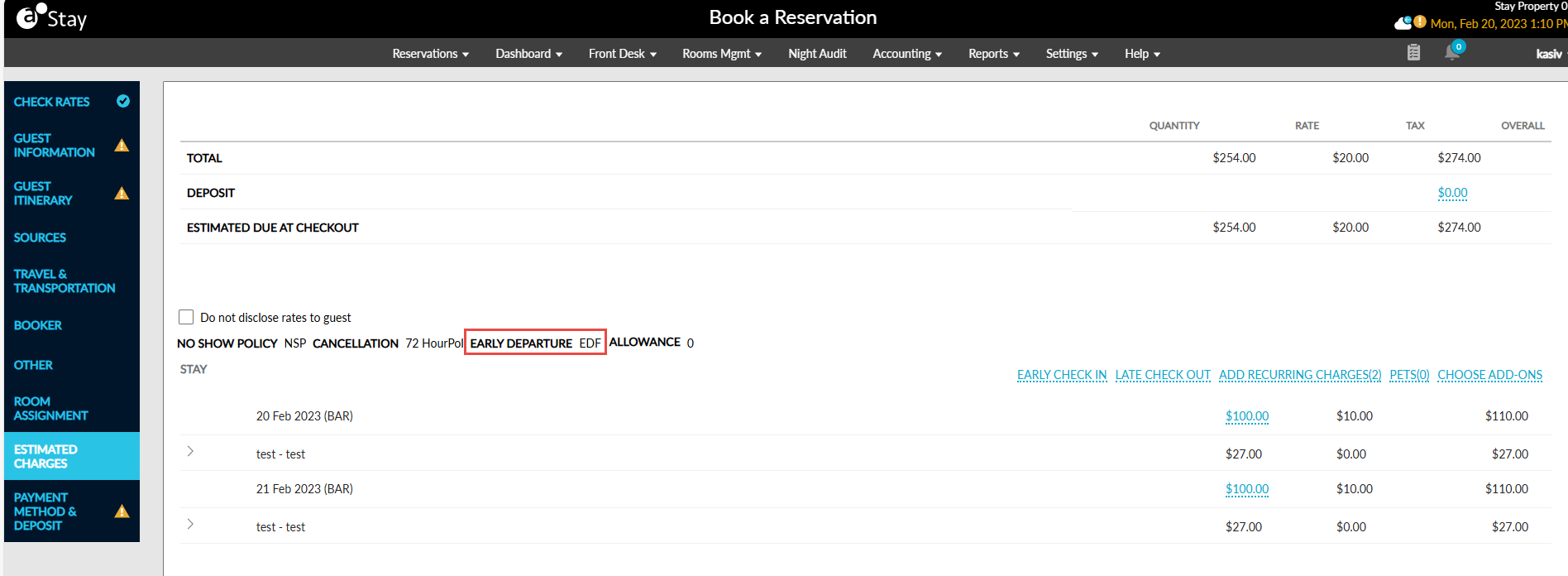
Book a Reservation: When the user selects the rooms and the rate plans for the required dates, the early departure fee applicable for the reservation based on the policy associated with the rate plan selected for the first night of stay is displayed in the Estimated Charges section of the Book a Reservation screen. This field is left empty if there is no policy mapped to the rate plan selected for the first night of stay.
-
Reservation: After the reservation is created, the early departure policy associated with the reservation is displayed on the Estimated Charges section of the reservation. Like the deposit and cancellation policy details, the early departure policy is displayed when the Estimated Charges section is expanded. The policy code is displayed as a hyperlink. When clicked, users can change the early departure policy associated with the reservation.
Overriding the Early Departure Policy Associated with a Reservation
Users with the Stay_OverrideEarlyDepartuePolicy permission can override and change the early departure policy associated with a reservation by clicking on the policy code hyperlink on the Estimated Charges section of the reservation. When clicked, the Override Policy screen appears that displays the following fields:
-
Early Departure Policy: This is a single-select drop-down list that displays all the active early departure policies configured at the property.
-
Override Reason: This is a text field that allows users to enter a reason for the override.
Users can select the required policy, enter a reason for the override and click the Save button. The reservation is updated with the newly selected policy.
When users override and change the early departure policy associated with a reservation, a record is created in the Reservation History log and in the Audit Log screen in the following format:
-
Early Departure Policy changed from <Original Policy Name> to <New Policy Name>
-
Added Early Departure Policy Override Reason <Reason entered by the user>
Applying Early Departure Fee to Reservations
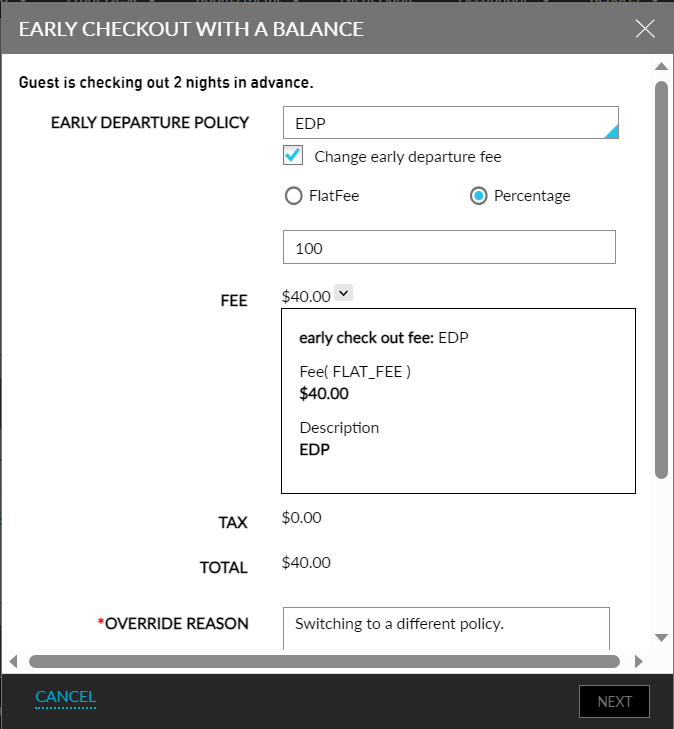
If the reservation is checked-out prior to its departure date, an early departure fee is applied to the reservations on the Early Checkout with a Balance screen based on the early departure policy associated with the reservation. This screen displays the following additional details:
-
The number of nights the guest is checking out early is displayed in the following format: The guest is checking out <Number of nights pending in reservation> nights in advance.
-
Early Departure Policy: This is a single-select drop-down list that displays the early departure policy that is associated with the reservation. Users can select a different policy from the drop-down list if required.
-
Change Early Departure Fee: Users can enable this checkbox to override and change the early departure fee for the reservation. When enabled, the following additional options are displayed to change the early departure fee:
-
Flat Fee: When selected, users can modify the fee amount directly. The entered amount is displayed in the Fee field and is applied as the new early departure fee for the reservation.
-
Percent: When selected, users can modify the fee amount in percentage. By default, the percentage is displayed as 100. Users can modify the percentage above or below 100. The updated amount based on the percentage is displayed in the Fee field and is applied as the new early departure fee.
-
-
Users can click on the expander next to the Fee field to view the details of the policy.
-
Below the early departure fee, the tax applicable for the early departure fee is displayed in the Tax field. The tax amount is calculated based on the tax classes mapped for the transaction item associated with the early departure policy.
-
The total of the early departure fee and the applicable taxes is displayed in the Total field below the tax field.
-
When users change the early departure policy or the fee amount, the Override Reason field is mandatory. Users must enter a reason for the override in this field.
-
Users must enter their credentials to override and change the early departure policy or fee. The credentials are validated to check if the Stay_OverrideEarlyDepartuePolicy permission is mapped. The following message is displayed to users without the permission: Access denied to override early departure policy.
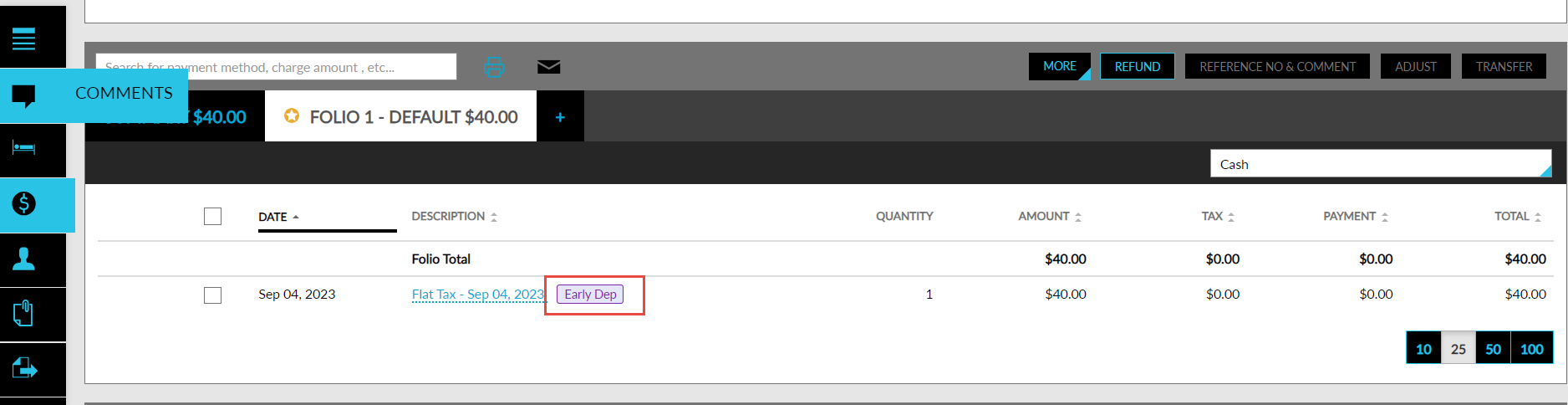
Users can click the Next button to proceed with the check-out. When the early departure fee is paid, the early departure fee is posted to the reservation folio along with the tax. If there are any routing rules set for the transaction item associated with the early departure policy, the early departure fee is routed accordingly. If the charges are scheduled to be split in the routing rules, the early departure fee is split amongst the payment methods.
The early departure fee is posted to the reservation folios with the Early Dept indicator. This indicator is also displayed when the folio is printed or emailed.
Modifying the Departure Date via Modify Stay
When users change the departure date of a reservation to an earlier date in the Modify Stay screen, an early departure fee for the reservation is calculated and displayed on the Early Departure Fee screen. This screen also displays the details mentioned in the Early Checkout with a Balance screen.
The applicable fee is scheduled to be added in the Estimated Charges section for the night before the check-out date. This fee is posted to the folio during the date roll to the departure date of the reservation. When the departure date of the reservation is modified again, the early departure fee is recalculated based on the following conditions:
-
If the new departure date is again lesser than the original departure date, the new early departure fee is added to the Estimated Charges section for the night before the check-out date.
-
If the new departure date is greater than or equal to the original departure date, no early departure fee is applicable for the reservation.
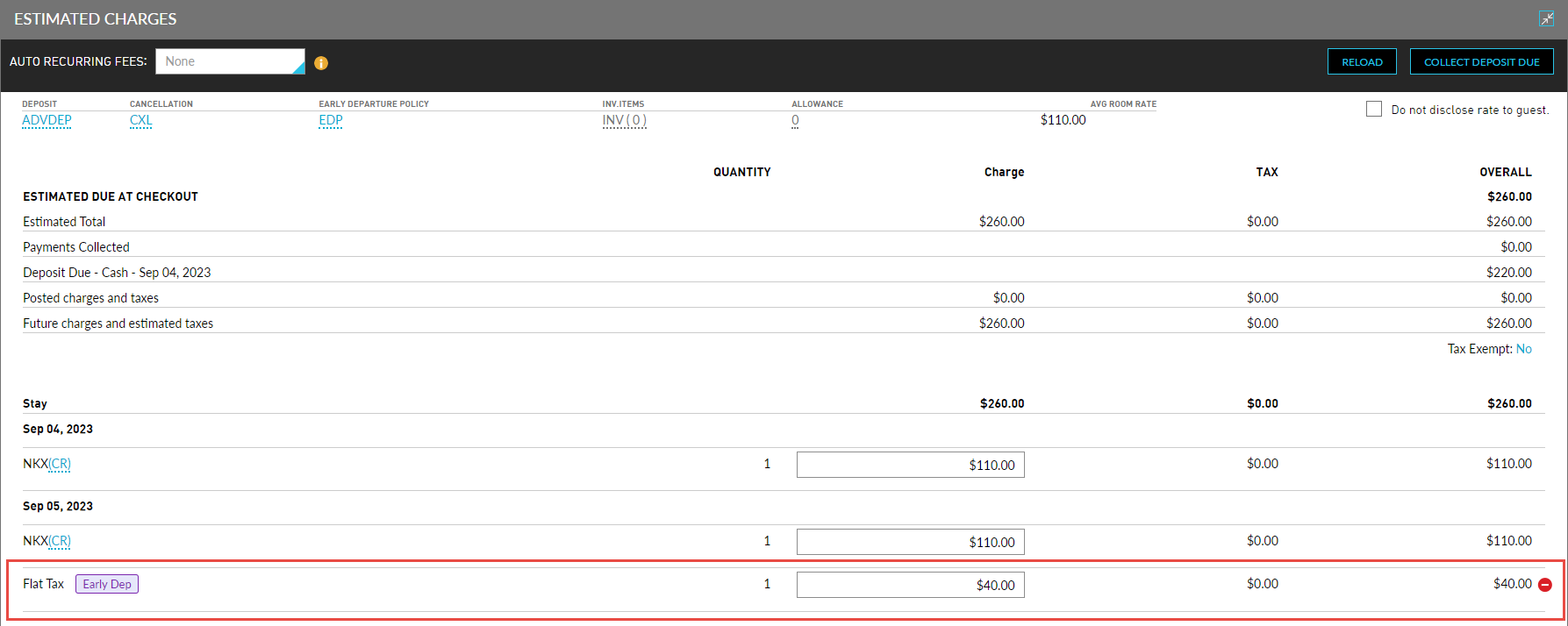
When Undo Check-out is performed for a reservation, the early departure fee is calculated and scheduled for the night before the check-out date, based on the new departure date selected in the Modify Stay screen. The early departure fee posted during the previous check-out is retained the same.